Introducing Qualcomm Linux – unified, simplified IoT development on Qualcomm Technolgies’ SoCs

To simplify your development of IoT solutions, Qualcomm Technologies, Inc. (QTI) is introducing Qualcomm® Linux® software stack, a package of software, tools and documentation for our IoT system-on-chips (SoCs). The Qualcomm Linux software stack is designed so you can unify your IoT development across our SoCs with a standards-based, upstream-aligned, open Linux.
This represents a big step in our developer-first focus. In this post, I’ll describe what’s in Qualcomm Linux and how you can use it to get your products into the fragmented IoT market sooner.
The Linux distribution optimized for Qualcomm Technologies’ IoT chipsets
As a single offering, Qualcomm Linux will allow you to develop once for Qualcomm Technologies’ s IoT SoCs – starting with our Qualcomm® QCS6490 and Qualcomm QCS5430 – without having to recompile and re-platform your applications. Working with open-source software and standardized frameworks maximizes the cross-compatibility and longevity of your products.
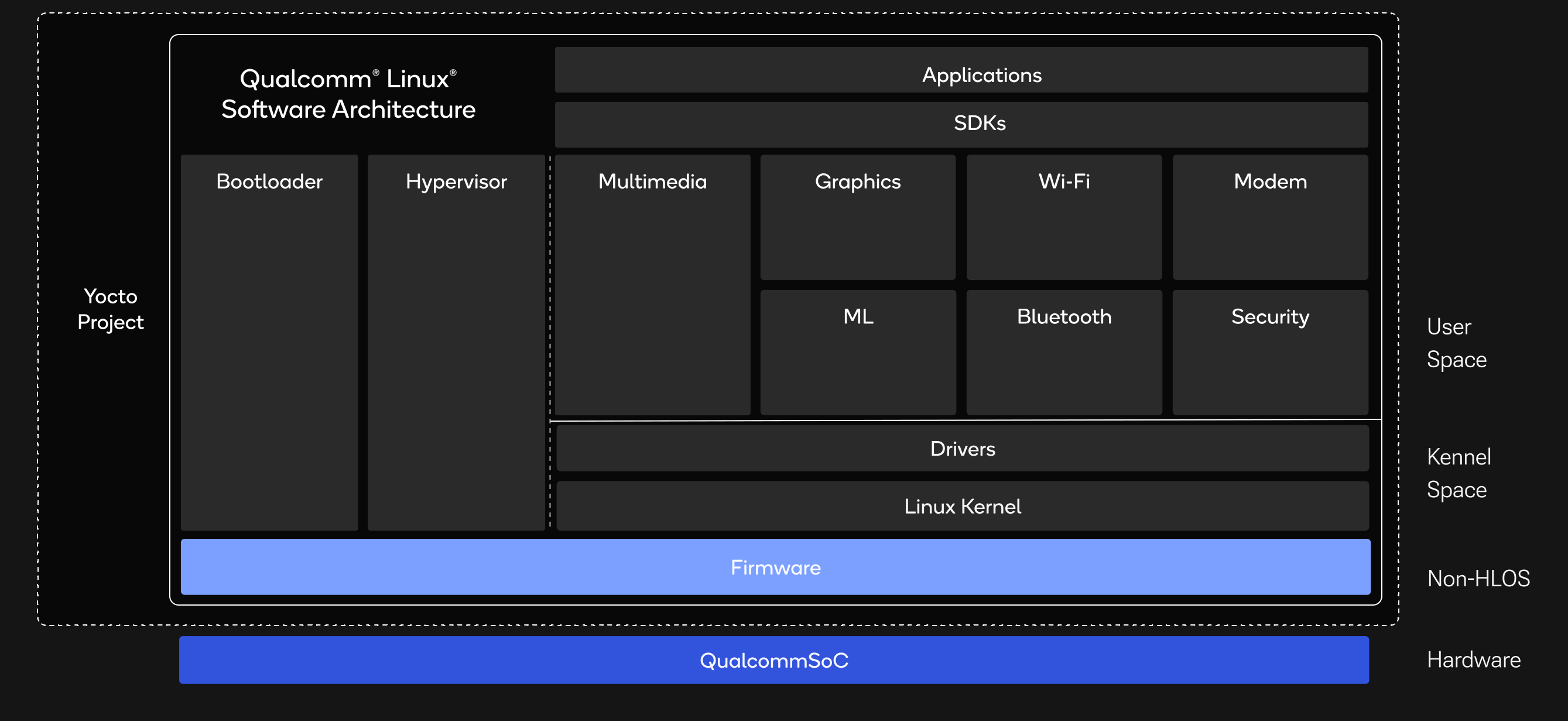
As shown in the image below, Qualcomm Linux is designed to ensure upstream compliance in your applications. Built around the long-term support (LTS) Linux kernel and UEFI bootloader, it also includes upstream drivers needed for userspace frameworks, Qualcomm Technologies’ firmware and the Yocto Project with value-adds from Qualcomm Technologies.
Software that’s aligned to standards
Qualcomm Linux is upstream-aligned and built so that you can easily adopt the open standards accepted in the Linux community. In our first releases you’ll see the significant progress we’ve made, and in future releases you’ll see fundamental changes to our software stack for ever-closer alignment to those standards.
The stack supports the processors, subsystems and components deep in the SoC, including CPU, GPU, VPU, DPU, NPU and PMICs. At the top of the stack are platform-agnostic software development kits containing resources, packages, sample applications and APIs so you can work more efficiently. For example, keep an eye out for a series of upcoming blog posts on how you can start using the Qualcomm Intelligent Multimedia SDK available from our portal.
Documentation that’s easy to access
You can easily discover and navigate most of the documentation on Qualcomm Linux through public channels like our portal. That includes descriptions of software stacks, block diagrams, FAQs and troubleshooting, readily accessible to you without the need to log in.
In the portal you’ll find procedures and video tutorials on topics like building sample apps and flashing hardware to get you up to speed much sooner. By opening up much more of our educational resources, we’re making it easier for you to research and use Qualcomm Linux on your own.
Tools and SDKs that improve your out-of-box experience
You can go only so far with the underlying silicon. That’s why we’re releasing tools and SDKs designed so you can get up and running on Qualcomm RB3 Gen 2 hardware development kit without having to start from the ground up. For fast onboarding, the portal makes it easy for you to update the software that comes pre-installed on the kit. You can find answers and post questions in our monitored community support forums and Discord server.
To shorten your time to market, we’re offering enhanced tools, starting with these:
- Qualcomm AI Hub – Simplified deployment of optimized AI Models on variety of IoT devices
- Qualcomm® Profiler – Real-time profiling so you can easily inspect performance of your applications on different subsystems.
- Qualcomm® Launcher – For downloading the source code, compilers and third-party elements needed for each SoC, with auto-compilation.
- Qualcomm® Device Cloud – Immediate access to Qualcomm platform hardware for remote testing.
- Primary tools – Easy access to basics like PCAT/QUTS, AI tools and compilers through Qualcomm Service Center
Initially available SDKs include the Qualcomm® Intelligent Multimedia SDK – with more than two dozen sample applications at launch – and the Qualcomm® Robotics Product SDK.
Get started
Qualcomm Linux is an opportunity for smoother onboarding, simpler development and shorter time to market for your IoT products.
You can get started by visiting our portal, purchasing a hardware development kit and trying the sample apps we’ve enabled with Qualcomm Linux on our IoT SoCs. And watch for our next posts about Qualcomm Linux. We’ll walk you through some of those sample apps and emphasize our upstream alignment in areas like AI inference and video transformation.
What else is trending for Internet of Things:
Read how CyberLink ports FaceMe to Qualcomm Hexagon NPU for facial recognition on edge devices
How Capgemini uses Qualcomm Dragonwing portoflio to enhance railway safety with Edge AI
Learn how to optimise your AI model for the Edge
Browse highlights from Embedded World 2025
Watch developer Build Along sessions:
MCP IoT Agent for Snapdragon X Elite and Rubik Pi
Using TensorFlow to accelerate models on Qualcomm IoT devices
Docker and Qualcomm Dragonwing RB3 Gen 2 x FoundriesFactory
AMA session with Qualcomm and Edge Impulse
AprilTag and Qualcomm RB3 Gen 2
What’s next?
Join our Discord community to keep up with our ongoing outreach to developers like you who work with Qualcomm Technologies’ products.
On Discord, you can rub elbows with our experts, connect with fellow developers working with our technology and keep your fingers on the pulse of developer-focused news and product updates.

